Sources
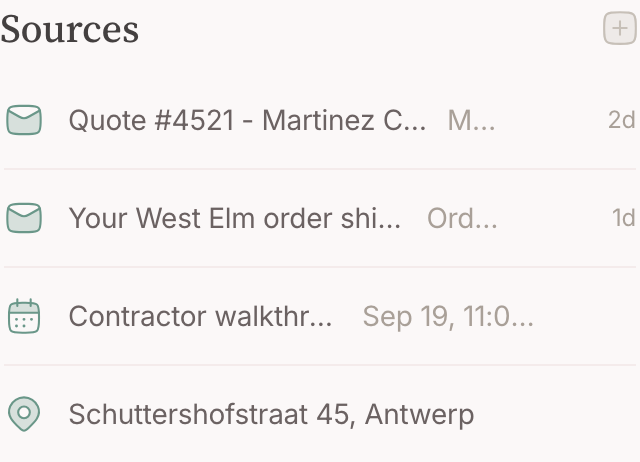
A mail, an event, a photo, a place and a signal are one kind of thing: something that arrived, queued in your Inbox, and hangs on the node you judged it onto.
Overview
While you slept, the world kept writing to you: two mails, an invitation for a date you have not looked at, an alert from a system at work. Add what you produce yourself — the photo of the whiteboard, the address of the restaurant — and your day is a steady stream of things that are about something. Mindnodes calls each of them a source: something that arrived and hangs on a node. A mail thread, a calendar event, a photo, a place, a signal — all five are the same kind of thing, and that is the idea worth having.
A source is not a copy. The mail stays in your mailbox and the event stays on your calendar; what Mindnodes keeps is the connection between that thing and the node it belongs to. This page is about that connection — and about the judgement of where each arriving thing belongs, which is the judgement your whole graph is built out of.
The five kinds
- Email — threads arrive from a mailbox you connected.
- Calendar events — arrive from a calendar you connected, or you make them yourself.
- Photos, files and links — you attach them.
- Locations — you keep them, from an address or a pin.
- Signals — pushed in by another system entirely.
A chat is deliberately not one of them: it did not arrive, it happened — a conversation lives in a section of its own beside the sources, and it never queues in the Inbox.
Basics
Hang one on a node
There are two directions, and they end in the same place:
- From the item — open it from the Inbox and use its Nodes field. Type what it belongs to; existing nodes are offered before a new one is made.
- From the node — use the + beside Sources and pick the kind. Mail, calendar events and places are attached from what you already have; media are made here.
Hang one on several nodes
A source is not owned by one node. The same event can sit on the client and on the trip; the same photo on the recipe and on the person who cooked it. Each link is its own, and unlinking one leaves the others standing.
Open one
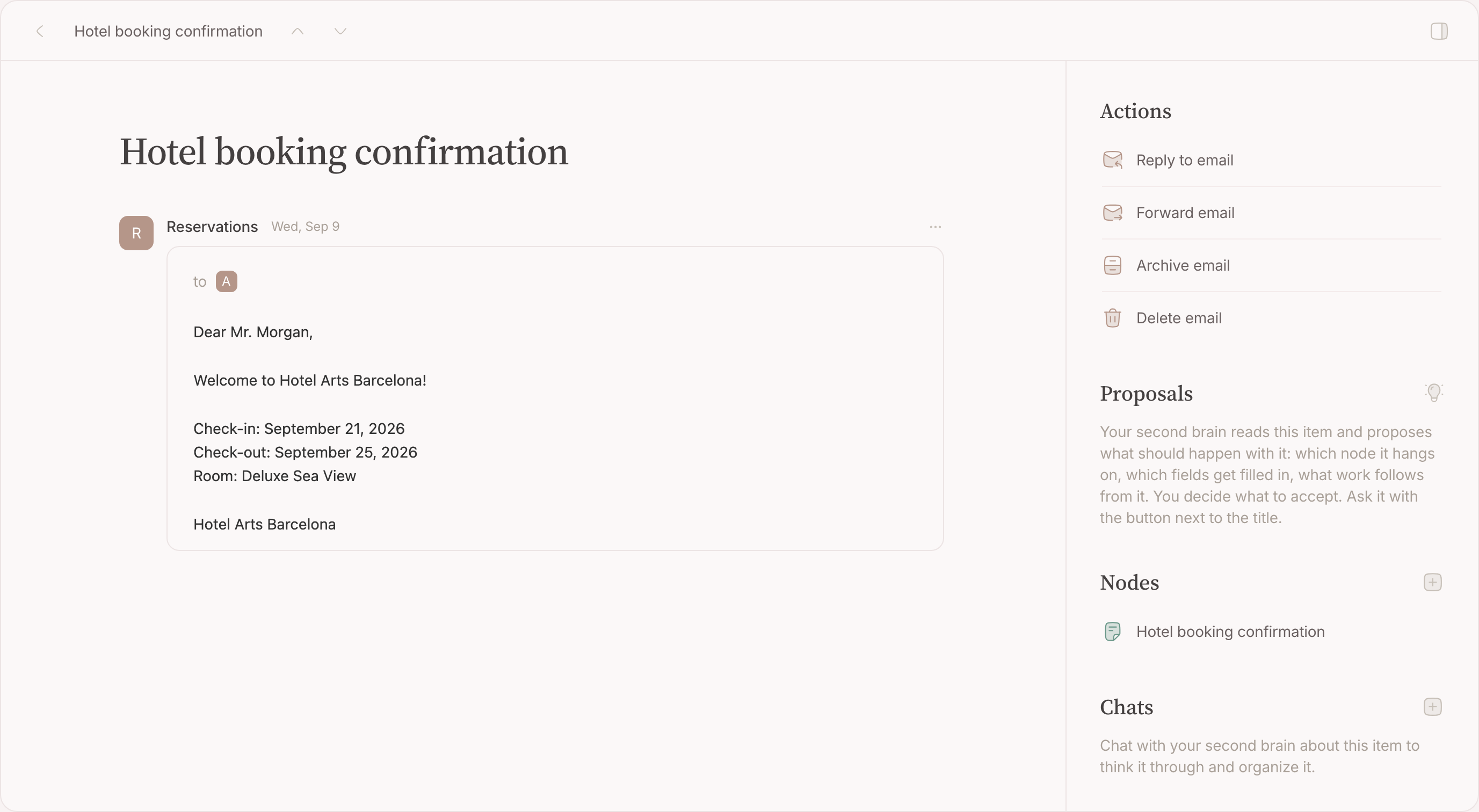
Clicking a source opens it in place on the node page, so you stay where you were. Every kind has the same shape: the thing itself, the nodes it hangs on, the chats about it, and its actions.
The Inbox
Everything that comes in from outside queues in the Inbox first, whatever kind it is, and so does every thought you save from the compose box. It is the page Mindnodes opens on the first time; after that, Mindnodes reopens where you left it. Deciding what an item belongs to and archiving it is the daily loop; hanging it on a node is the step in the middle.
Before anything arrives
Nothing to set up: a thought you save from the compose box queues at once, and so does a photo or link you share to Mindnodes from your phone. Mail and calendar arrive once you connect a Google account in settings; signals once another system pushes them in.
Read the queue
Items are grouped by the day they arrived — today, yesterday, then dated days — and ordered by recency within a day, all kinds interleaved. An invitation for next month sits beside the mail that came in with it, because both landed this morning.
Open an item
Every kind opens on the same page: the item itself on the left, and a sidebar with the nodes it hangs on, the chats about it, and its actions ( ⌘K ).
Link it to a node
The + in the open item's Nodes section, exactly as above: type what it belongs to, link as many as apply, and each row carries its own unlink button. Linking never archives — those are two answers, and the next one is yours.
Archive an item
Run Archive from the item's actions ( ⌘K ), or select several rows and archive them together. The row drops out of the list as it goes.
Archiving is the verdict on the item, not on the thing behind it: the mail stays in your mailbox, the event stays on your calendar, and every link you made stays on the node. An item does not have to be linked to anything first — archiving unread is a legitimate answer.
Bring one back
Turn on the Archived switch in the topbar to browse what you settled, then run Unarchive on the item. It returns to the queue where it was.
Delete an item
Delete removes the item and its envelope. ⌘⌫ does it from the open item.
Filter the queue
Two controls on the page itself do the work:
- The type tabs above the list — All, and one tab for each kind the queue holds: mail, calendar items, media, locations, signals and thoughts. One at a time.
- Archived — a switch in the topbar that stays pressed while it is on, and turns the queue into a browse surface for what you already settled.
Work through several at once
Select rows and the topbar becomes a selection bar. Archive, unarchive, link, unlink and delete all act on the whole selection.
Which node does it hang on?
Every kind asks this in its own words — the exact steps for a mail, an event, a photo, a place or a signal are on that kind's own page. What follows is what they have in common, and it is three things.
Start from what it is about
A source hangs on the thing it is about — not on whoever appears in it, and not on what kind of item it is. Two traps, and they return with every kind:
- Not the participant. The doctor is in the appointment, not what it is about. Hanging every event on the doctor's node is filing a wedding photo under "photographer" — keep the doctor as a node of her own and relate the two instead.
- Not the format. A node named "Confirmations", "Invoices" or "Photos 2025" is a folder wearing a node's name. You will never search for "confirmation"; you will search for the thing that was confirmed. What kind of item something is stays visible on the item itself.
Two items converging on one thing is itself the sign that the thing deserves a node: an event and the mail confirming it are about one visit, and that visit is the node they both hang on.
As specific as it deserves, and no further
Hang an item on the most specific node that has earned its place. The appointment you are preparing for: its own node. The routine check-up with nothing to say: the doctor's node, for the record — or nowhere at all. Archiving an item without linking it is a full answer.
Never mint a node just to give a source somewhere to hang, and never lay structure out in advance. A person's node is made the first time something points at them — referring to a thing is what earns it — not because the rest of the family might come up one day.
- Not "Check-up, 14 August", minted for a routine visit, but the event on the doctor's node — or archived unlinked. Nothing goes in and nothing comes out; there is nothing to write.
- Not a "Head office" node while the company has one address, but the pin on the company itself. You never have to say which one until there are two.
- Not a node for every family member laid out in advance, but a person's node the first time something points at them. Referring is what earns a node; stock structure is a filing cabinet.
What repeats
Something that recurs takes one of three shapes, and the same tests pick between them:
- Repetition without content. Bins out, a recurring focus block, the weekly newsletter. No node, no link — archive it.
- Interchangeable turns around one standing thing. Every groceries run, every night you cooked that dish, the monthly invoice from the same supplier. The items hang on the standing node — the shopping list, the recipe, the subscription — and pile up into its history: each carries its own date, so the node answers "when, and how often" by itself. Do not copy into the node's text what its sources already record.
- Turns that pass the test. The yearly festival trip: tickets and mails go in, photos and stories come out. Each turn is an edition — its own node, named by its year, related to the standing thing. "Tomorrowland 2025" is a proper name, not a date added to tell copies apart: it is what everyone calls it.
With editions, put every fact where it stays true: is this still true next year? The festival's location is — it hangs on the festival. This year's photos are not — they hang on the edition.
The whole flow
The judgements chain into one path. Walk it top to bottom for anything — arrived or thought of: each step is one question with two exits, every branch ends in being done with the item, and most are done in three questions or fewer.
- What is it about? Name the thing itself — not who appears in it, not what kind of item it is. About nothing you would ever look for — logistics, a receipt, idle noise? Archive it unlinked, or delete the thought, and stop.
- Is it reserved time? Only a calendar event can be: one that blocks hours for something that already exists — a task, the groceries run — hangs on that thing. Archive, and stop. Everything else skips this step.
- Does something go in, or come out? No: it is an activity. Hang it on the standing thing it serves, or on nothing at all — archive, and stop. Yes: the thing deserves a node .
- Does that node exist? Search first — an earlier mail, event or thought may have made it already. Found: hang the item on it, or land the thought on it as a page. Not found: make it, under its proper name — a thought can become that node itself.
- Dress a new node. The category when the noun is obvious, the area when the part of life is. Relate it to the things you will come looking through — the person, the project, the standing thing it is an edition of.
- Archive the item. Linking never did it; say you are finished. Archiving never unlinks either, and a thought is never archived: landing it is what takes it out of the queue.
FAQ
Do chats show up here?
No. A chat is not a source — it happens on the node and lives beside its sources — and it never queues in the Inbox.
Does archiving delete anything?
Never. Nothing is deleted by archiving.
Can an archived item come back by itself?
Yes, when there is news. A rescheduled meeting or a new reply returns the item to the queue.
Where do archived items live?
In the same queue, behind the Archived switch. There is no separate archive page.
What if I chose wrong?
Merge two nodes that turned out to be one. Move a source to the right node. Give the line in a note that grew its own mail a node of its own, and relate it back. Every judgement here is about one item, and each can be redone without touching the rest.
Does my second brain use these rules?
Yes. It reads what arrives here too, and the same judgements guide what it suggests — which node an item hangs on, and when a new one is worth making. Nothing it suggests happens without your yes; how that works is on Proposals , later in this guide.
Do I need to decide all this before I write anything?
No. Write it down first — the compose box does not ask. The tests are for the moments you hesitate, and for reading back why the graph feels right when you do not.
Does unlinking delete the thing?
Not for mail, events, media or signals — those stay where they live. A place is the one exception: take the last node off it and the place goes too, because a pin with no note on it is not a place you wanted.
Can a node have no sources?
Most nodes do. A node made from a thought starts that way: your words became its page, and nothing hangs on it yet.