Top of mind
The handful of things you are carrying, kept in the sidebar under the compose box: the nodes you chose, and the ones a close deadline or a running block adds to them.
Overview
Every morning starts with the same question: what was I doing? Not everything on your lists — the four or five things that are your life right now: the release, the contractor, the friend you keep meaning to call. Top of mind is that handful, kept in the sidebar under the compose box and the inbox. On a wide screen it stands beside whatever page you have open; on a phone it is the column the app opens on.
By now everything in this guide has a place — the nodes, the labels, the thoughts, the sources, the lenses. A lens is a question, asked again every time you open it; Top of mind is the opposite — a hand-picked set, and the only one in Mindnodes you fill in by hand. The world adds to it in just two ways, and both are about time: a deadline closing in, and an hour you set aside that has come.
Basics
Keep a node in view
Keeping a node there is called pinning it. Any node can be pinned, and there are three ways in:
- From its actions — Keep node top of mind , on the node page and in the actions of a row.
- From a list — press Space on the row your pointer is on.
- On a phone — swipe the row left.
See that it is there
A pinned node says so with a small mark at the end of its row, wherever that row appears. Clicking the mark takes the pin off again — the same click, from anywhere you meet it. Taking a pin off changes nothing else about the node: a pin is a note to yourself, not a property of the node.
Open one
Click a row and the page goes to that node; back returns you to where you were. In the desktop app, ⌘1 to ⌘9 open the first nine rows.
What the world adds
Two kinds of row arrive without you asking, and each says why it is there with a small mark at its end:
- A deadline closing in — a node whose due date has passed, is today or is tomorrow, marked with an alarm clock. A due date is what puts it there; see Areas & categories .
- An hour you set aside — a node with a block of yours on the calendar that is running, from a quarter of an hour before it starts until a quarter of an hour after it ends, marked with a calendar. You come out of the hour with something to write down, and the row is still there to write it on.
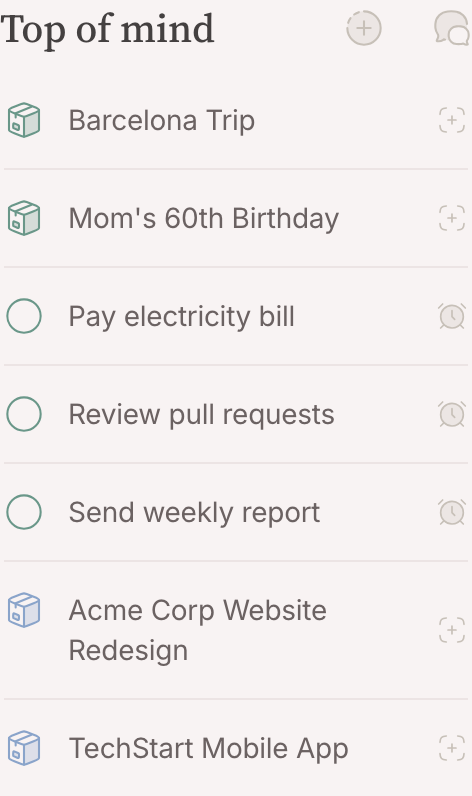
The list keeps one order — by area, then category, then title — and no row climbs because the clock moved. It is short enough to read whole, and a row that jumps is a row you cannot point at.
What takes a row off
A pin is a note to yourself, so what takes it off is answering it. Two things do:
- Planning it. Open the calendar and drag the row across from the sidebar onto an hour, and it becomes a block, linked to the node, as long as its duration says or an hour if it has not said. Deciding when is an answer, so your pin comes off. The row comes back while the block runs, and leaves after. Delete the block and the pin stays off: pin the node again if it still asks for you. A row that is there for its deadline has no pin to answer, so planning leaves it standing until the work is done.
- Finishing it. A task you tick off or cancel leaves, whatever put it there. Reopening it does not put the pin back — undoing the work does not re-ask the question — though a close deadline still will.
FAQ
Where does Mindnodes open?
On the inbox the first time, because what you put down and what arrived both wait there for a place. After that it reopens where you left it. On a phone, opening the app opens on the column with the compose box and Top of mind instead — a link to a page opens that page, with the column one step back. Top of mind is one glance away either way, so there is no start page to choose.
Why is a node here that I never pinned?
Its deadline is close, or a block you planned for it is running — the mark at the end of the row says which. Neither has a pin to take off: a deadline is a fact about the work, not a note you left yourself. Finish the work, or move the due date if the world moved it.
How many things should I keep top of mind?
As few as you can bear. The list is meant to be read at a glance in the morning; a Top of mind of thirty rows is a backlog, and a backlog belongs in a lens .
Is Top of mind shared?
No. It is personal and lives on your account — a note to yourself, and publishing a node never shows what you keep top of mind. Someone who finishes a task you share clears their own pin on it, not yours.