From thought to done
One loop for your work: the to-do leaves your head in a second, earns its hour in the morning, and on Friday you read the week off your calendar.
It starts mid-afternoon, in the middle of something else. Book the dentist. Send the invoice. Ask about the deposit. And it ends on a Monday morning months later, staring at a list of ninety things, forty of them from before Easter, wondering which three to feel bad about first.
Those are the two ends of one loop, and this page walks it whole: the thought leaves your head in the time it takes to type it, earns its hour on an honest morning, gets done — and on Friday the week reads itself back off your calendar. No sorting ritual in the middle, no stage of piles. A to-do is captured once, decided daily, and finished visibly.
Set up once
Nothing, to start capturing. A new account already carries a Task category, and that category is what makes a note a to-do: it brings a status, a priority, a due date and a duration with it. Connect a calendar for the planning half — that is where the plan lives, so without one there is nothing to drop the work onto.
The loop
-
Get it out of your head
The create form is there from anywhere, and you are typing within a second. Book the dentist — the words you would have said out loud. A + opens the category picker without your hands leaving the field; a few letters find Task, Enter creates it with its status already on To Do . The field clears and you are in position for the next one — three to-dos in a row cost three sentences and three Enters. While you type, the rows below narrow to what you already have, which is how you find out you wrote this same one last week.
-
Give it a date, if the world gave it one
Still in the same field, a / opens what the node can carry — pick due date, pick a day, and the date joins the box as a pill that Enter keeps. A due date is when the world needs it, not when you intend to do it: the deadline on the invoice is a fact, the ambition to do it Tuesday is not. Leave the ambitions off; the loop below is where they get decided. -
On Monday, say what the week is for
Open the three or four things this stretch is actually about and keep each one top of mind . They stand in the sidebar, under the compose box, until the work is done or has its hour, so what you decided on Monday is still in front of you on Thursday. Not everything you would like to do: everything you actually believe you will. -
Each morning, read Top of mind
Ten past eight, coffee in hand, and Top of mind has already laid the morning out: what you chose to carry, and in among it anything with a deadline that has passed or falls today or tomorrow. Those rows are the ones the world adds for you, and each carries a small alarm clock, so you can tell what you decided from what came due.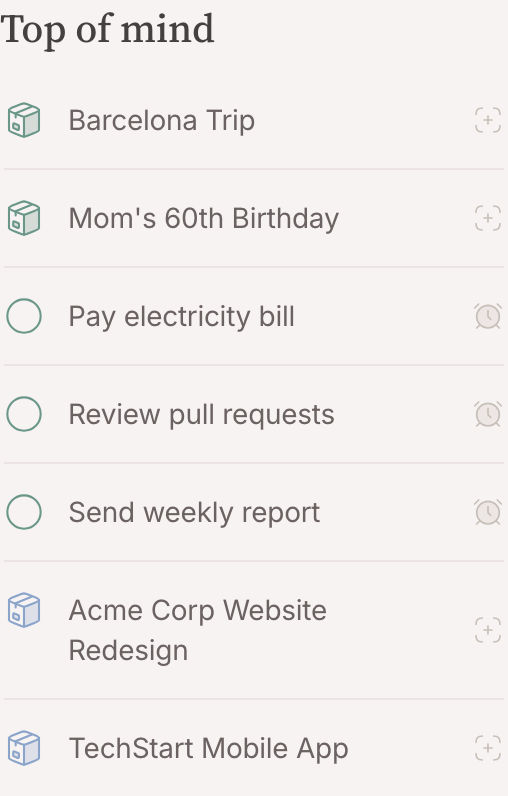
-
Drag today full
Open the calendar on today beside the sidebar. Every row drags: lift one onto an hour and it becomes a block on your calendar, as long as the task said it would take. It lands up against everything else that wants the same hour, and that collision is the point: a day is a number of hours, and this is where you find out how many are left.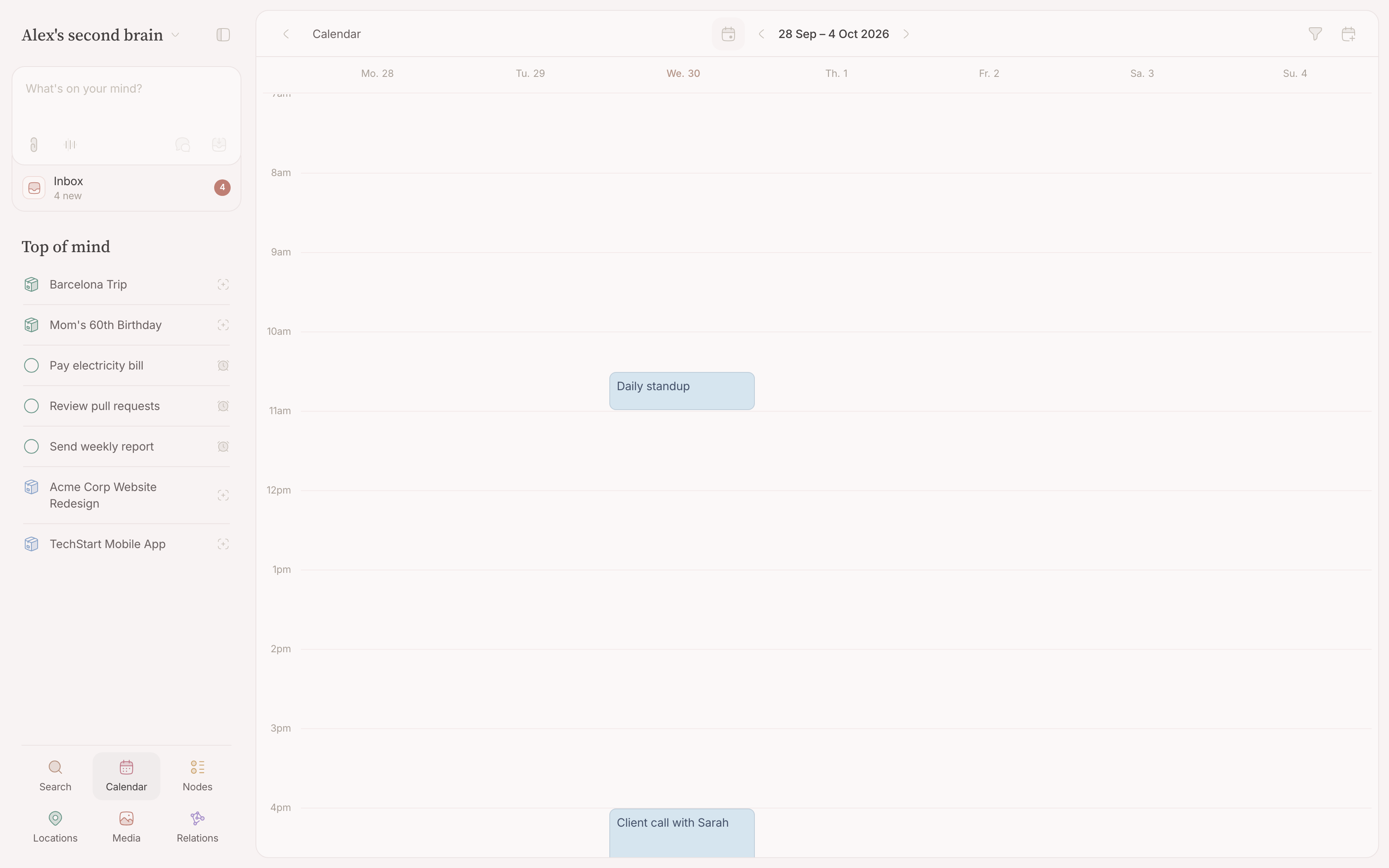
-
Let planned work step aside
Giving a row you chose its hour answers why you kept it in view, so it leaves Top of mind — it is not waiting on a decision any more. It comes back by itself while the block runs, which is when you need it. If the hour passes and the work is still open, keep it top of mind again: a plan that did not happen is a decision to make again, never one the list quietly makes for you. A row that is there for its deadline stays until the work is done — planning it does not change when the world needs it. -
Do it, and tick it off
The circle in front of the row. It fills in, the checkmark draws itself, and the node stops asking for attention — out of Top of mind, whatever put it there. -
On Friday, read the week off your calendar
Open the calendar on the week and look back. The blocks are what happened — that is the retrospective, and it costs nothing to produce. The rows still standing in Top of mind are what you neither finished nor gave an hour, plus any open work whose deadline has come close: finished work leaves by itself, so what remains is exactly what you are carrying into next week, already in front of you on Monday. -
Leave the rest in the backlog
Everything that never earned a place in Top of mind or a deadline stays in your lists, untouched. That is not failure, that is the honest position — a list you have not decided about is better than a stage of guesses that look like commitments.
Where your second brain helps
It can propose a deadline on something that arrived by mail, propose the task an invitation implies, and tell you what is open on a project when you ask. It cannot decide what your week is for, and it cannot fill your calendar. Which work deserves an hour of your day is the one judgement in this loop worth making yourself — it takes a drag, and it is the drag that makes the week yours rather than a queue you are being fed.
Going further
Break the big ones down. The steps of one job are checkboxes inside its note — order tiles, book the plumber — ticked as you go, so the task stays one thing however many steps it takes. A step that grows its own mail or its own deadline stopped being a step: give it a node of its own and relate the two.
Hang the work on what it serves. Relate a to-do to the project or the person it is for and it shows up on that page, so opening the project answers "what is left" without reconstructing.
Keep a backlog lens. Narrow a list to the Task category, add the status and deadline filters you triage by, and save it as a lens . That lens is the pile Monday's three or four are pulled from — and a list with a columns dimension is the status board for reporting, so deciding and reporting are two different pages instead of one page doing neither well.