Thoughts
Write it down before you know where it belongs: the compose box saves what is on your mind to your inbox as a thought, and you turn it into a node when you are ready.
Overview
You are in the queue at the bakery when it comes to you: the bathroom tiles are going to be the matt green after all — and the contractor said to order them before Friday, or the plumber slips a week. You do not know yet whether that is a task, a line on the renovation or something to ask about. You only want it out of your head before the queue moves.
That is the moment the compose box is for: the field at the top of the sidebar that asks What's on your mind? You write first and decide afterwards, and there are only two ways out. Save, and the text waits as a thought in your inbox — the queue where what arrives from outside waits too, covered later in this guide. Ask, and it starts a chat. On a phone the same column is the first screen, with the box on top.
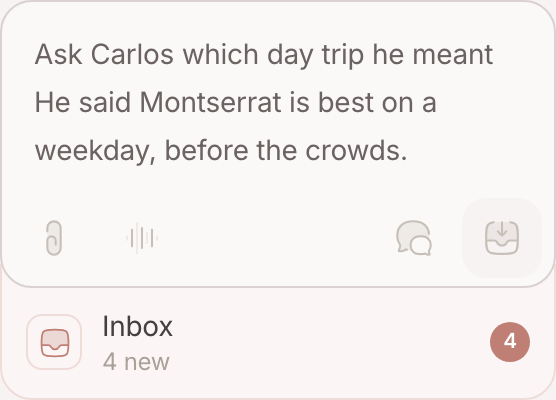
A thought is something you put down, not yet something you keep. What it leads to — a task, a line on a project, a person to call back — is a question for later, and the answer is always a node .
Basics
Put a thought down
Type it and press Enter . The box empties and the thought stands in your inbox, called by its first line; three thoughts cost three sentences and three Enters. ⇧Enter breaks a line instead of saving. Dictating works the same way: stop the recording and what you said lands in the field, to save as it stands or finish by hand first — speaking is the quickest way to put something down. A photo or a file dropped on the box goes along with the text.
Save is the default on purpose. Writing something down without saying what it is for almost always means: get it out first, think about it later.
Ask instead
Some of what you write is not something to keep but a question — what still has to happen for the bathroom this week? Press ⌘Enter and the same text becomes the first message of a chat — a conversation with your second brain, covered later in this guide — and you land in it. Nothing waits in the inbox then: the question lives in the chat.
Turn it into a node
Open the thought in the inbox and decide what it leads to. Make a node from it — the node form opens with its first line already typed, so Get the bike tyre fixed is one Enter away from a task of that name — or pick a node you already keep. Either way the thought hangs on that node, the way a mail does, so you can always see where it started. Then archive it: it has done its job.
The node is where you write it the way you want to keep it — a better title, its labels, a due date, a sentence or two of your own. The thought does not have to be copied over; it is right there beside the note. Your second brain reads every saved thought too and proposes what follows from it, in the same way; that proposal waits for your yes, and how it works is on Proposals .
Let it go
A thought that turned out to be nothing is deleted, like any item in the inbox. That is a full answer too.
A thought is where something starts
What you write in the queue at the bakery is rarely the note you want to keep. It is half a sentence, the word you had at hand, the order you thought of it in. The node is the version you keep: named so you will find it, labelled so it shows up where it belongs, and written as long or as short as it deserves.
So a thought is treated like everything else that reaches your inbox: you decide what it means, hang it on the node it led to, and archive it. Archived, it is not a pile of loose notes — every one of them hangs on the node it became, and the archive is simply the record of what you put down.
Which node does it lead to?
Most thoughts continue something you already keep — the person, the project, the place, the plan. Start from what it is about, search for that, and hang it there. Only a thing that stands on its own gets a node of its own; when something deserves one is on Nodes .
- Not a new node Green tiles , but the choice written into the note of Bathroom renovation , with the thought hung on it. The tiles are a decision inside the project, and the project is where you will look for it when the tiler asks.
- Not a line in the renovation's note for order the tiles before Friday , but a node of its own — a task, due Friday — related to the project. A thing with its own deadline has to be able to come looking for you, and a line in a note cannot.
- Not a node for where you parked this morning, but the bin. Nothing you will ever look for deserves a place, and deleting it is how the inbox stays a list of what still needs you.
FAQ
Do I have to know where it goes before I write it?
No. That is the point of the box: it does not ask. Deciding is for later, when you open the inbox.
Can I keep a thought without doing anything with it?
It waits in the inbox for as long as you leave it. Archive it once it has led somewhere — or delete it, if it turned out to be nothing.
Is what I wrote kept?
Yes. The thought hangs on the node it led to, word for word, and stays findable in the inbox's archive. Only deleting it throws it away.
Can I write when I am offline?
Yes. The thought is in your inbox the moment you save it, and reaches your other devices when the connection comes back.
Who can read my thoughts?
You. A thought is private, and so is the node it leads to — until you publish that node.